
- What is Bing Ads | Microsoft Advertising?
- How does Microsoft Advertising work?
- Types of Microsoft ads
- Benefits of Microsoft Advertising
What are Bing Ads | Microsoft Advertising?
Microsoft Advertising, formerly Bing Ads, Microsoft adCenter and MSN adCenter, is a service that provides pay-per-click (PPC) advertising.
Your ads can appear above or to the right of Bing, Yahoo and MSN search results. You can target different geographic regions, specific times or days of the week, and demographic categories.
Regardless of your business size, this form of advertising will bring you significant success. It offers solutions whether you focus on a local or global market and want to direct your audience to a particular website.
The Microsoft Search Network handles 8.2 billion searches worldwide each month.
How does Bing-Microsoft advertising work?
Microsoft Advertising is a pay-per-click (PPC) advertising system.
You bid according to the amount you are willing to pay for each click on your ad.
Since websites have a limited number of places to display ads, those spaces are sold at auction. You bid against other advertisers to have your ads placed in your preferred space. You decide how much you are willing to bid.
Ad position depends on several factors, including:
1. How well your ad and website match the search terms (relevance).
2. How your bid compares with other bids in the Microsoft Advertising auction.
3. How your ad has performed in the past and how often it was clicked (click-through rate).
The stronger you perform in these areas, the better your chances of securing the top ad position.
Types of Bing-Microsoft ads
Responsive search ads (Responsive search ads)
They simplify ad creation by eliminating the need to determine which headlines and descriptions perform well.
You need to create up to 15 headlines and 4 descriptions. Using these, Microsoft Advertising will select the best combinations to create effective ads for your potential customers. The best-performing ad combinations are automatically identified and reported to you, while ineffective ads stop appearing.
Your ad content is adapted to match what potential customers are searching for, improving your campaign's performance.
App Install Ads (Ads for installing an app)
App install ads resemble text ads but provide direct links to your apps through a button, taking customers straight to the appropriate location to download the app. This is an ideal solution for advertisers looking to manage and encourage app downloads.
They automatically detect the customer's mobile device and operating system, sending them to the appropriate Apple App Store or Google Play store. You can also track conversions with the same conversion tracking partners as app extensions: AppsFlier, Kochava, Tune, Singular, Adjust and Branch.
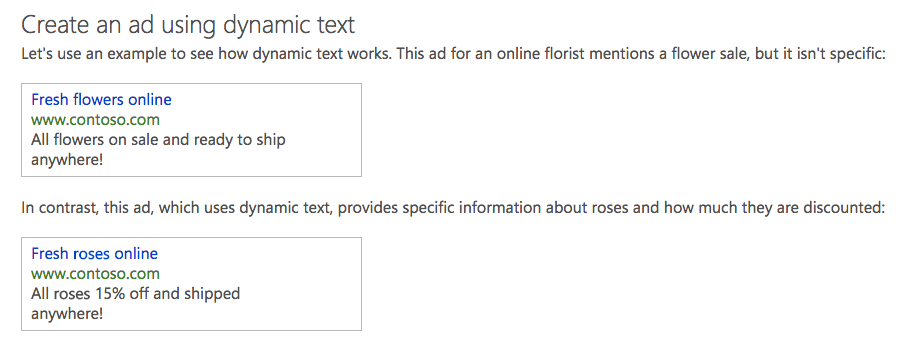
Dynamic search ads (Dynamic search ads)
They automatically target relevant search queries based on your website's content and are generated dynamically to respond to those queries.
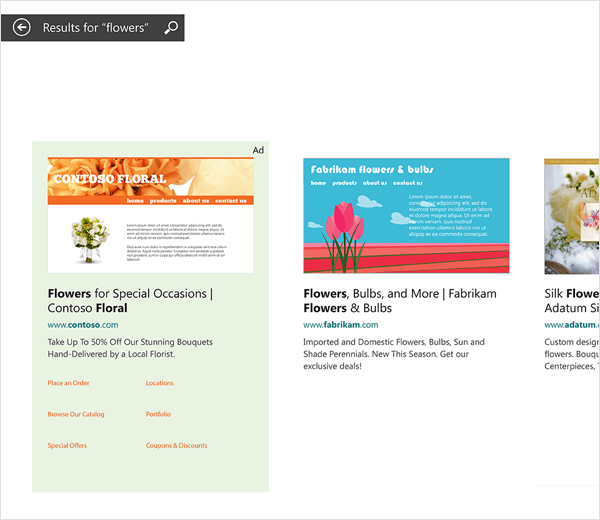
Bing Smart Search ads (Bing Smart Search ads)
Similar to text ads on Bing, AOL and Yahoo search network websites, but formatted for a modern touch experience and shown in Windows 8.1 Smart Search results. Where possible, these ads will include a preview of your landing page.
Microsoft Advertising in Windows 8.1 Smart Search is available in the United States, the United Kingdom and Canada.
Microsoft Audience Ads
This feature enables advertisers to attract additional high-quality traffic from placements outside search. Microsoft Audience Ads experiences, such as in-article ads, engage users, integrate naturally into page content and deliver visually rich advertising for advertisers.
Microsoft Audience Ads appear on the Microsoft Audience Network. These ad placements span multiple devices and include premium websites such as MSN, Outlook.com, Microsoft Edge and other partners.
Multimedia Ads (Multimedia ads)
Multimedia ads capture potential customers' attention with large visual images showcasing your brand and products, helping increase traffic and sales on your website. Multimedia ads will appear in various mainline and sidebar ad positions and will not replace your text ad placements.
Product ads (Product advertisements)
Product ads include custom images from your own product catalogs, created in Microsoft Merchant Center, along with specific promotional copy, prices and seller details.
Benefits of Bing–Microsoft advertising
- REACH A RELEVANT AUDIENCE
Reach people with greater purchasing power who spend more online and are more likely to respond to your ads.
- BUILD SMARTER CUSTOMER JOURNEYS
Create personalized experiences using powerful audience intelligence and platform capabilities that improve campaign performance.
- EASY INTEGRATION WITH OTHER ADVERTISING PLATFORMS
If you already use another product, such as Google Ads or Facebook Ads, you can easily integrate that campaign into Microsoft Advertising.
- NO MINIMUM FEE
Registration is free.
- PAY ONLY FOR CLICKS
You only pay when customers click your ad. No click, no charge.
- PERFORMANCE MEASUREMENT
Test keywords, bids and timing to maximize your return on investment.
- DAILY BUDGET
Set your budget or adjust your spending on a daily basis.
Ad Kraft has successfully managed Microsoft Ads advertising for our local and international clients for many years. We recommend it as part of your marketing mix, alongside Google, Facebook and LinkedIn advertising.
Let's work together to accelerate your company's growth.